Manage It Easy/ Features/ Dues & Payments
Billing, reminders and late fees in one place

HOA dues software that keeps every payment on track.

Set the billing cycle once. From there the HOA dues software sends invoices on schedule, reminders go to the stragglers, and HOA late fee automation applies the fee without anyone deciding to. Your board watches one dashboard instead of running one.

Explore every capability ↓
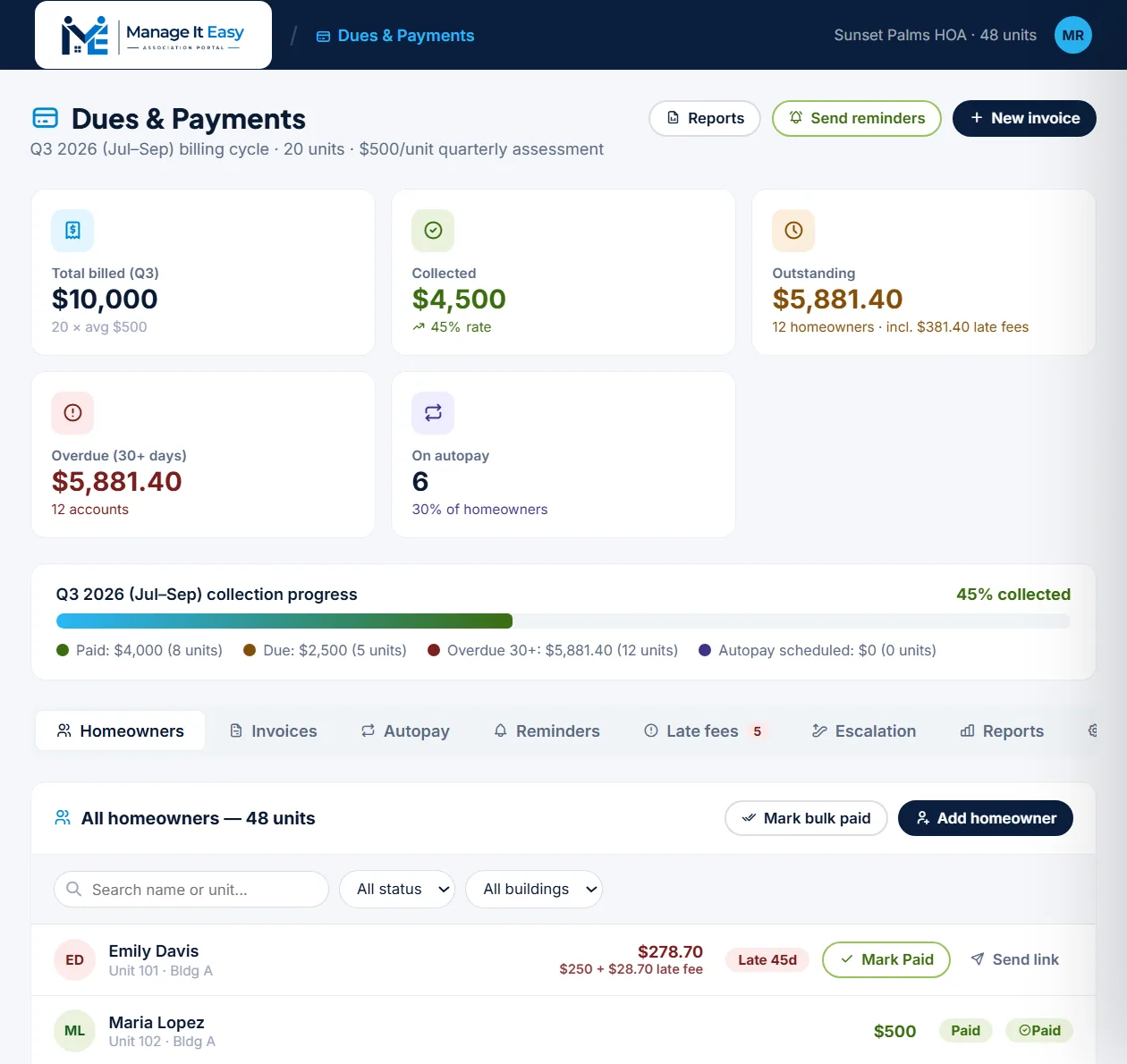
Itemized balances, recorded payments Homeowners see exactly what they owe in the association dues payment portal, and the board records each payment and each HOA autopay enrollment.
Autopay enrollment tracked
Late fees apply automatically
portal.manageiteasy.com/dues-payments
Dues & Payments inside the Manage It Easy portal
What you can actually do

HOA dues tracking: everything a treasurer used to do by hand, done for them.

This is condo assessment collection software, not a payment button bolted onto a spreadsheet: cycles, invoices, reminders, late fees, escalation and reporting, all connected to the same ledger.

Flexible billing cycles

Run quarterly, monthly, annual or semi-annual assessments. Set the amount per unit once, and every invoice for the cycle inherits it.

Five invoice types

Quarterly assessments, special assessments, late-fee invoices, amenity fees or a fully custom charge. Send any of them to everyone or to a specific group. One association dues payment portal handles all of them.

HOA autopay enrollment, tracked

Homeowners opt in to autopay from their resident portal, and the board sees who has enrolled in the homeowner list and on the dashboard.

Automated reminder rules

Build rules that fire days before the due date, on it, or after it. Each one goes by email, SMS or portal notice to exactly who needs the nudge.

HOA late fee automation

HOA late fee automation with a grace period, a flat fee, an annual interest rate charged daily as simple interest, and a cap. Fees apply automatically once grace runs out, or wait for board approval.

HOA collections workflow, staged

A staged HOA collections workflow for accounts 30+ days overdue: reminders, demand letters, then the pre-lien notice. Every stage is editable, reorderable and board-gated where it matters.

Reports, exported instantly

Collection summaries, delinquency reports, the full YTD ledger, transaction logs and homeowner statements. CSV or XLSX, one click. Good HOA dues software reports without a second spreadsheet.

Per-homeowner ledger

Open any unit to see balance, payment history and autopay status, then act: mark paid, send a reminder, waive, or apply a fee. The association dues payment portal keeps that history for good.

Notification preferences you control

Email receipts, SMS confirmations, board alerts on every payment or only on overdue accounts, and a weekly collections digest. Toggle each one on or off. Condo assessment collection software should tell the board only what it needs to know.

Every screen, in full

This is the actual module, tab by tab.

Not a highlight reel. Here's every tab your board will actually click on, and exactly what's in it, on real numbers from a 48-unit association.

Tab 1

Homeowners, every unit, always current

The full 48-unit roster in one table, which is where most work in condo assessment collection software starts. Search, filter, act in bulk, and drill into any single homeowner in two clicks.

  • Instant search by name or unit number as you type.
  • Filter by status, Paid, Due, Overdue, Partial, or Autopay, or by building (A, B, C).
  • Bulk actions: select any group and mark them all paid in one click, or add a new homeowner directly to the roster.
  • Per-homeowner detail view: current balance, complete payment history, and live autopay status.
  • Quick actions on any account, Mark paid, Send pay link, Waive balance, or Apply a fee, no separate screen required.
  • Internal board notes attached to each homeowner, visible only to the board, never the resident.

Add homeowner, takes under a minute

Name & unitFirst, last, unit #, building
Assessment$500 / quarter
Autopay?Yes / No
ContactEmail + phone
On saveWelcome email sent
Tab 2

Invoices, five types, sent exactly where they should go

One "Create invoice" flow handles every kind of charge your association ever needs to bill.

  • Five invoice types: quarterly assessment, special assessment, late fee invoice, amenity fee, or a fully custom charge.
  • Choose the billing period, current quarter, next quarter, or a full annual cycle.
  • Target the send: all 48 homeowners, overdue-only accounts, due-only accounts, or hand-pick specific units.
  • Pick the delivery method: Email + SMS, email only, SMS only, or portal notice only.
  • Add a note homeowners will see on that specific invoice, for context, no separate email needed.
  • Invoice history keeps a permanent, searchable record of every invoice ever sent.

Last invoice sent

TypeQuarterly assessment
Amount$500 / unit
Sent toAll homeowners (48)
DeliveryEmail + SMS
Result48 notified instantly
Tab 3

Autopay enrollment, in one place

See at a glance which homeowners have opted in to HOA autopay, and which have not.

  • Self-serve enrollment homeowners opt in from their own resident portal, with no board involvement.
  • Enrollment status shown in the homeowner list, so the board can filter by who has enrolled.
  • Clear history every enrollment and cancellation is logged on the homeowner's record.
  • On the dashboard see how many homeowners are enrolled, as a share of all homes.
  • Bulk reminders send a reminder to every outstanding homeowner in two clicks.

Autopay enrollment

Enrolled19 of 48
Enrollment rate40%
Opt inResident portal
HistoryLogged per homeowner
Tab 4

Reminders, the nudge sends itself

Build the rule once and the association dues payment portal takes it from there, sending the right homeowner the right message at the right moment.

  • Custom rules: trigger a reminder a set number of days before, on, or after the due date.
  • Delivery channel per rule, Email + SMS, email only, SMS only, or portal notice only.
  • Precise targeting: all outstanding homeowners, overdue accounts only (30+ days), or due-but-not-yet-overdue.
  • Live preview shows the exact email or text before it ever sends, filled in with real amounts and dates.
  • "Send now" for a one-off manual nudge whenever the board wants one, outside the automated schedule.
Subject: Your Q3 2025 HOA dues are due, Sunset Palms
Dear Homeowner,
Your Q3 2025 assessment of $500.00 for your unit is due October 1, 2025.

Pay securely: portal.manageiteasy.com/pay

Already paid? Disregard this notice.
, Sunset Palms HOA Board
Tab 5

Late fees, consistent, and never forgotten

Set your rules once and HOA late fee automation treats every overdue account exactly the same way, every time. No board member has to remember to apply a fee.

  • Grace period in days before any fee can apply, starts counting the moment an invoice goes overdue.
  • Flat fee plus interest a fixed dollar amount, plus an annual interest rate charged daily on the remaining balance as simple interest.
  • Hard cap so accumulated fees can never exceed a maximum you set, no runaway charges.
  • Two enforcement modes: apply automatically the moment grace ends, or hold every fee for board approval first.
  • One screen for exceptions: apply fees to selected accounts, or waive all outstanding fees in a single click.

Default rule set

Grace period15 days
Flat late fee$25
Annual interest18%
Interest capOptional
Accounts affected4 this cycle
Tab 6

Escalation, your collections policy, encoded

An editable HOA collections workflow for accounts that stay delinquent, so "we should probably send a letter" never sits unresolved again.

  • Add, reorder, or remove stages to match exactly how your board handles delinquency.
  • Each stage defines a trigger, days past due, and an action: reminder, late fee, demand letter, pre-lien notice, board review, lien filing packet, restrict amenity access, or a fully custom action.
  • Choose who handles it: the system automatically, or the board must review and approve before anything goes out.
  • Attach an internal note to any stage, e.g. citing the exact CC&R section, so nothing depends on someone's memory.
  • One click to send demand letters or prepare a lien filing packet for every currently-escalated account.

Default escalation stages

30 daysAuto
30+ days, demand letterBoard
Pre-lien noticeBoard
Lien filing packetBoard
Tab 7

Reports, whatever's asked for, in two clicks

Live data pulled straight from the ledger, with nothing to compile and nothing to double-check against a spreadsheet.

  • Monthly collections chart, filterable by date range, building, and status.
  • Collection progress see how much of the billing cycle has been collected at a glance.
  • Collection summary and delinquency report, exported as CSV.
  • Full ledger (XLSX, every transaction, year-to-date) for your accountant.
  • Transaction log and a homeowner statements CSV pack, ready to hand to any resident who asks.
  • Skip the export entirely, email a collection summary straight to every director instead.

Export formats

Collection summaryCSV
Delinquency reportCSV
Full ledger (YTD)XLSX
Homeowner statementsCSV pack
Board summaryEmail
Tab 8

Settings, configured once, correct forever

Every rule above is driven from here. Set it up during onboarding, and the whole module runs on your terms from day one. That is HOA dues software configured once.

  • Payment recording the board marks payments as received, one at a time or in bulk, and the ledger updates.
  • Toggle options autopay enrollment and partial payments, each independently switchable.
  • Billing cycle configuration: assessment frequency (quarterly, monthly, annual, or semi-annual), amount per unit, cycle start date, due date, and the cycle label shown on every invoice.
  • Notification preferences, controlled individually, see the live list on the right.

Notification preferences

  • Email receipt on payment
  • SMS payment confirmation
  • Board alert on every payment
  • Overdue account alert
  • Weekly digest to board
The feature boards love most

Reminders mean this stops being a monthly task.

Once the cycle is set, reminders and late fees run on their own, and chasing a payment is no longer something anyone on the board has to remember to do.

1

Invoice goes out

The invoice is delivered by email with the amount per unit already set, and the homeowner sees the same figure in their portal.

2

Reminders follow the schedule

Before the due date, on it and after it, each homeowner gets the right nudge, with no one on the board sending it by hand.

3

Payment recorded, ledger updated

When the board marks a payment received, the homeowner's balance and your books update together, so there is nothing to reconcile later.

!
Failed payment?

Anything still unpaid after the grace period moves to late fees and the collections workflow, so the first attempt needs no chasing.

When someone falls behind

Condo assessment collection software, mapped out before you need it.

The default HOA collections workflow is shown below. Every stage is editable, and you decide which ones the system handles on its own and which wait for board sign-off.

DAY 0

Invoice sent

Assessment invoice delivered by email. The homeowner sees the exact amount due in their resident portal.

Automatic
DAY 15

Grace period ends

Default grace period. After this, a flat $25 late fee plus interest at 18% a year, charged daily as simple interest, applies automatically or waits for board approval. Interest can be capped.

Configurable
DAY 30

Escalation begins

Account enters the overdue workflow: automated reminder emails and SMS intensify, and the board gets a flagged notification.

Automatic
DAY 30+

Demand letter

A formal demand letter is prepared and sent. Every action logged to the homeowner's file for a clean paper trail.

Board approves
Ongoing

Pre-lien notice & filing packet

For accounts that stay delinquent, a pre-lien notice and lien filing packet are prepared, the board reviews and approves before anything is filed.

Board approves
How payments work

Payments recorded the way your board already collects them.

Mark payments received one at a time or in bulk, and the ledger, the balance and the reports all update together.

Marked paid by the board

Checks, cash, bank transfers or any other method, recorded with the date and amount.

Any method
The ledger and the homeowner's balance update the moment the board saves the payment.

Visible to the homeowner

Balance, interest, late fees and payment history, itemized in the resident portal.

Itemized lines
Homeowners see the assessment, interest and late fee as separate lines, with no call to the board.
Built for volunteer boards, not accountants

You didn't sign up to be a collections agent. Now you don't have to be.

Every automation here exists to remove a task from a board member's plate, not to add another dashboard to babysit. Set the rules once; the system does the recurring work.

✓

No manual reconciliation. Every payment the board marks as received updates the ledger and the homeowner's balance together.

✓

Bulk actions when you need them. Mark dozens of accounts paid at once, or send reminders to every outstanding homeowner in two clicks.

✓

Nothing requires a spreadsheet. Collection rate, aging, autopay enrollment, all live on one screen, always current.

✓

Board oversight where it matters. Routine reminders and late fees run themselves; anything formal, demand letters, liens, waits for a human sign-off.

Questions treasurers actually ask

Dues & payments, the fine print

Straight answers before you get your board on a call.

How do homeowners pay, and where is it recorded?+
Homeowners pay the way your association already collects, such as check, cash or bank transfer, and the board marks the payment received. The ledger, the balance and the reports update together, and every homeowner sees their balance and payment history in their own portal. Every payment is recorded in the same association dues payment portal and the same HOA dues software.
Can homeowners see what they owe?+
Yes. In their resident portal homeowners see the amount due with interest and late fees itemized, plus their payment history, so they do not have to ask the board. They can also opt in to HOA autopay from the same login. The association dues payment portal keeps that history for good.
What does the HOA collections workflow do when a homeowner goes overdue?+
After your grace period, HOA late fee automation applies the fee, or holds it for board approval, whichever you chose. Past 30 days, the built-in escalation workflow moves the account through reminders, demand letters, and pre-lien notice, with the board approving any formal action. The HOA collections workflow is fully editable.
What does HOA autopay enrollment do?+
Homeowners opt in to HOA autopay from their resident portal, and the board sees who has enrolled in the homeowner list and on the dashboard. Every enrollment and cancellation is logged on the homeowner's record.
Can we run special assessments, not just regular dues?+
Yes. The HOA dues software issues special assessments, late fee invoices, amenity fees or a fully custom charge, to every homeowner or to one group. HOA late fee automation creates the late-fee invoice for you.
Ready when your board is

See Dues & Payments set up on your association, live.

We'll set up your real billing cycle, reminders and late-fee rules in the condo assessment collection software together. About 20 minutes, no commitment.